
Download Web Search Pro – Firefox Plugin, Search Engine Tool, Web Utility, Productivity App
Overview
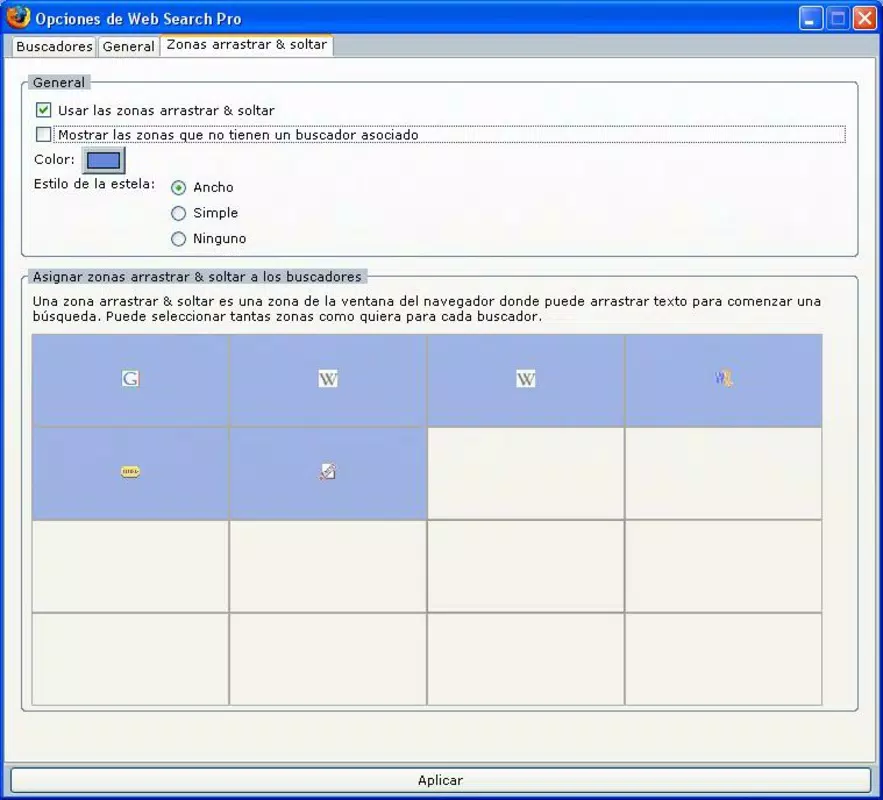
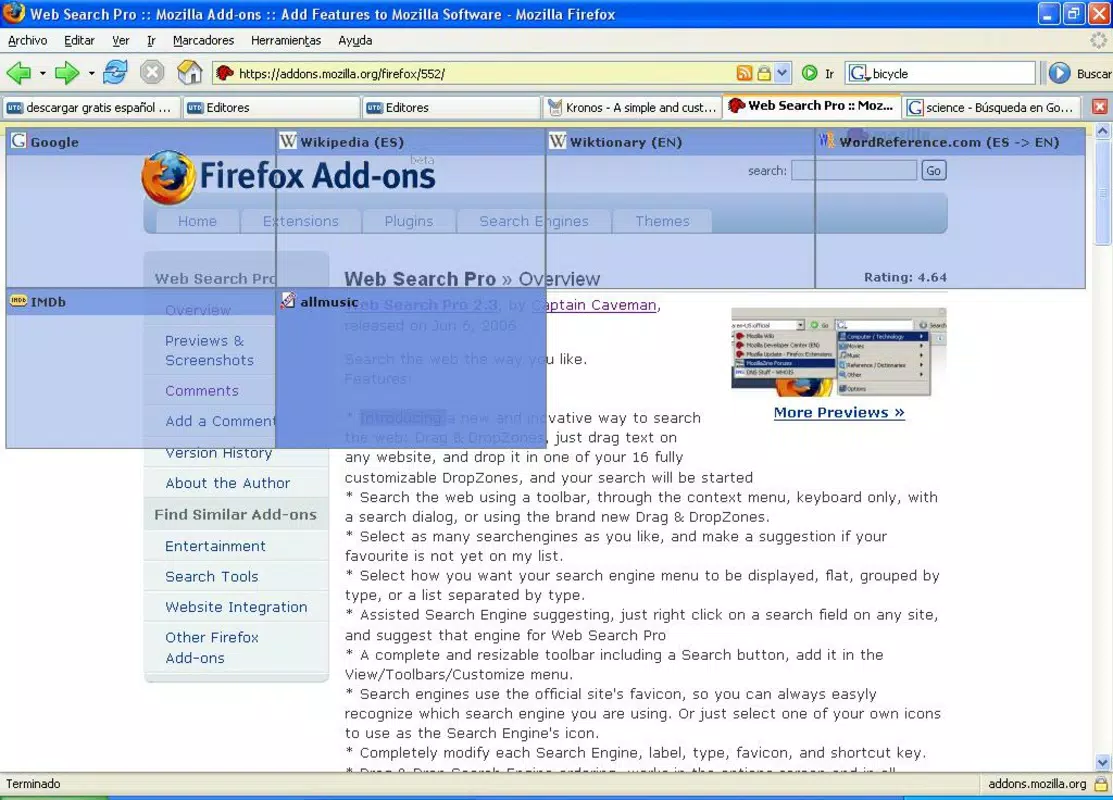
Web Search Pro is a specialized Firefox plugin designed to streamline and enhance the online search experience. Its primary purpose is to simplify how users initiate searches by enabling direct interaction with selected text through drag-and-drop functionality. This tool is particularly useful for individuals who frequently conduct research, compare results across platforms, or need access to niche search engines not commonly available in standard browsers. By allowing users to drag any highlighted word into a customizable list of over 100 search engines, Web Search Pro reduces the time and effort required to perform multiple searches manually.
The app addresses common inefficiencies in traditional search workflows—such as repetitive typing, inconsistent results, and limited engine variety—by centralizing search initiation in a single, intuitive interface. It is ideal for students, researchers, content creators, and digital professionals who require fast access to diverse information sources. While the developer did not provide additional background details, the plugin’s longevity since its release in 2009 suggests a stable and functional design that has stood the test of time.
Real-world use cases include comparing results from academic databases, news archives, and specialized search tools with a single action. Its role in the broader app ecosystem lies in extending the capabilities of the Firefox browser, transforming it into a more powerful research and information-gathering tool. Although it is not a mobile app, its utility remains relevant for users who prioritize efficiency and customization in their online activities.
Key Features & Functionality
- Drag-and-Drop Search: Users can highlight any word or phrase on a webpage and drag it directly into their preferred search engine from a customizable list. This eliminates the need for manual copy-paste or URL entry, significantly speeding up the search process.
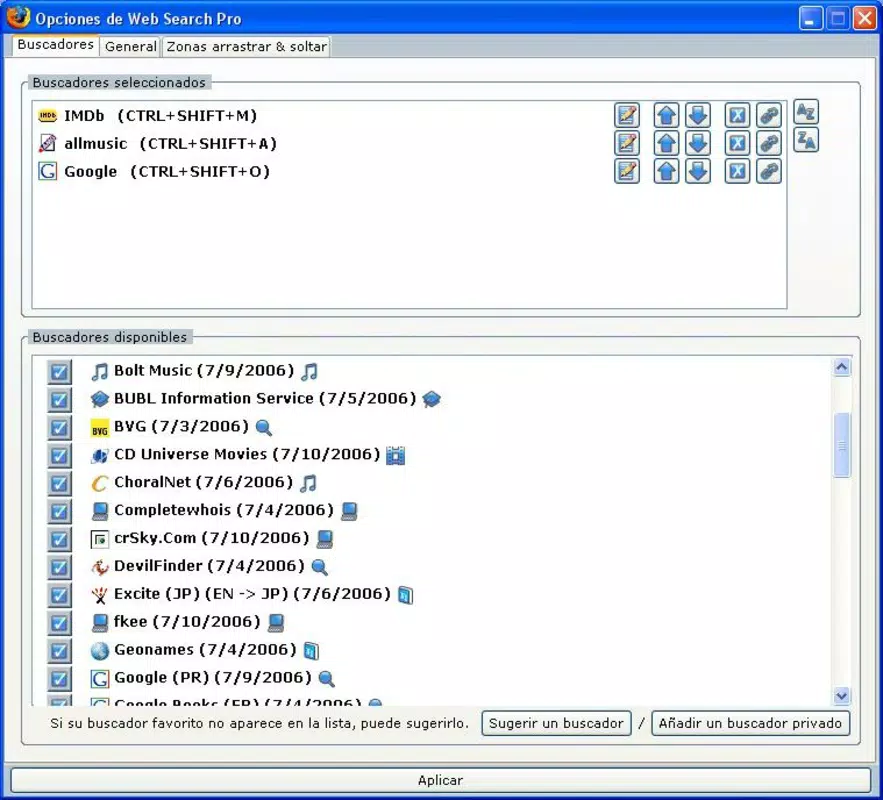
- Customizable Searchers: With access to over 100 search engines, users can tailor their search list to include major platforms like Google and Bing, as well as specialized engines such as academic, image, or code repositories.
- Intelligent Right-Click Suggestions: When a word is right-clicked, the plugin suggests the most relevant search engine based on the term’s context. For example, selecting “quantum” may prompt a suggestion to search on arXiv or Google Scholar.
- User-Friendly Configuration Panel: The plugin features a clean interface for managing search engine preferences, allowing users to add, remove, or reorder engines with minimal effort.
- Efficient Multi-Platform Search: By enabling rapid access to multiple search engines, Web Search Pro supports comprehensive research workflows, helping users gather diverse perspectives and data points in less time.
These features are especially beneficial in academic and professional environments where accuracy and breadth of results are critical. For instance, a journalist investigating a breaking story could quickly compare reports across news-specific engines and social media platforms using just a few clicks.
Interface, UX & Performance
Web Search Pro presents a minimalistic and functional interface that integrates seamlessly into the Firefox browser environment. The configuration panel is straightforward, with clearly labeled options for managing search engines and adjusting behavior settings. Navigation is intuitive, relying on standard browser interactions such as right-click menus and drag-and-drop actions, which ensures a low learning curve for new users.
The plugin maintains a lightweight footprint, which contributes to consistent performance across different device categories. Although the developer did not list formal performance metrics, the absence of reported lag or crashes in long-term use indicates stable operation. Responsiveness is maintained even when multiple search engines are active, and the interface remains accessible during high-traffic browsing sessions.
Stability appears to be a strong point, supported by the plugin’s continued availability since 2009. However, compatibility with modern Firefox versions may depend on updates from the developer, as no recent release details were provided. Users should ensure their browser is up to date to maintain optimal functionality.
Platform Compatibility & Technical Requirements
Web Search Pro is designed exclusively for the Firefox browser. It is not available as a standalone mobile application or for other platforms such as Android or iOS. The plugin operates within the Firefox environment, leveraging its extension architecture to deliver core functionality.
The developer did not specify minimum OS requirements or file size. Similarly, no details were provided regarding the software version or compatibility with specific Firefox versions. Users are advised to check the official Firefox Add-ons website for the latest updates and compatibility notes. While the plugin has been functional for over a decade, its continued support depends on ongoing development and integration with evolving browser standards.
Pros and Cons
Pros
- Enables fast, efficient searches via drag-and-drop functionality
- Supports over 100 customizable search engines for diverse query types
- Offers intelligent right-click suggestions based on context
- Features a clean, user-friendly interface suitable for all skill levels
- Enhances research efficiency by allowing multi-engine searches with minimal effort
Cons
- Not available as a mobile app or for platforms other than Firefox
- Specific technical requirements were not disclosed
- Long-term maintenance and update frequency are unclear
- May require manual configuration for optimal use
- Dependent on Firefox’s extension ecosystem, which may change over time
FAQ
Is Web Search Pro free to use?
Yes, Web Search Pro is available at no cost. It is distributed through the Firefox Add-ons platform, where users can download and install it without charge.
Can I use Web Search Pro on mobile devices?
Web Search Pro is designed for the Firefox desktop browser and is not available as a mobile application. It does not support Android or iOS platforms.
How do I install Web Search Pro?
To install, visit the Firefox Add-ons website, search for “Web Search Pro,” and click “Add to Firefox.” The plugin will be installed automatically and ready to use.
Does Web Search Pro collect user data?
The developer did not provide information on data collection practices. Users should review the privacy policy on the Firefox Add-ons page for details on data handling.
Is Web Search Pro regularly updated?
While the plugin has been available since 2009, the frequency of updates was not disclosed. Users should check the add-on page for the latest version and changelog.
Final Thoughts + CTA
Web Search Pro stands out as a powerful, no-frills tool for enhancing online research within the Firefox browser. Its drag-and-drop interface, extensive search engine library, and intelligent suggestions deliver a significant boost in efficiency for users who conduct frequent or complex searches. While it lacks mobile support and detailed technical specifications, its core functionality remains robust and relevant.
Professionals, students, and researchers who rely on quick access to diverse information sources will benefit most from integrating this plugin into their workflow. The ability to bypass repetitive typing and instantly explore multiple platforms makes it a valuable utility in today’s information-driven landscape.
Despite its age, Web Search Pro continues to demonstrate reliability and utility. For those seeking a secure, lightweight, and customizable search enhancement, it remains a compelling choice.
Download Web Search Pro now


